Non-Cartesian Coordinate Systems
Initial support for volume rendering of data defined in 3D non-cartesian coordinate systems was added in yt_idv 0.5.0 for block-AMR data in spherical coordinates. While not all rendering methods and annotations are supported for spherical coordinates, yt_idv can directly calculate maximum intensity projections, integrative projections and projection with custom transfer functions without any pre-interpolation or re-gridding.
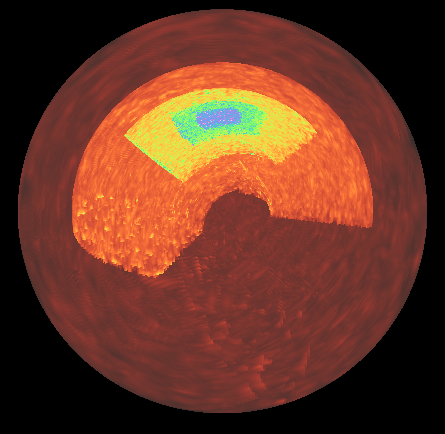
The approach for handling data defined in non-cartesian coordinates is to pre-calculate cartesian bounding boxes of the data blocks. The rendering pipeline uses those cartesian bounding boxes for a first cut at discarding blocks that a ray misses. For blocks that are not discarded, the true ray entry/exit points are then found analytically from the surfaces bounding the volume element: for spherical coordinates, the inner and outer spherical surfaces at constant radius, the conical surfaces at constant co-latitude and the planes at constant azimuth. A ray may enter and exit a single element more than once, so each entry/exit pair is sampled separately. Between an entry/exit pair, the cartesian coordinates of the ray position are converted to the native coordinates of the data, which is used to sample the texture maps (which are stored in native coordinates). The step size taken between an entry/exit pair is set by the characteristic lengths of the volume element,
where \(r\) and \(\theta\) are evaluated at the closest approach of the ray to the origin
within the element and \(\eta\) is a sampling factor. The sample_factor attribute of the
BlockRendering component stores \(\log_{10} \eta\) for spherical data, in contrast to
cartesian data where sample_factor is the number of samples per cell width.
At present, supported non-cartesian coordinate systems include Spherical Coordinates with (r, theta, phi), where r is radius, theta is co-latitude (between 0, pi) and phi is azimuth, following yt conventions, as well as yt’s geographic and internal geographic coordinates (see below).
Geographic coordinates
Datasets with yt’s geographic (latitude, longitude, altitude) and internal_geographic
(latitude, longitude, depth) geometries are rendered with the same machinery as spherical
data: when the data is loaded, the block edges are converted to spherical coordinates with
\(\theta = 90^\circ - \mathrm{latitude}\) and \(\phi = \mathrm{longitude}\)
(both in radians). Longitudes may be given in either (-180, 180) or (0, 360).
The native radial coordinate is converted to a radius using a reference height,
geographic: \(r = \mathrm{altitude} + h_{ref}\)internal_geographic: \(r = h_{ref} - \mathrm{depth}\)
By default, \(h_{ref}\) is the dataset’s own value, surface_height for geographic
and outer_radius for internal_geographic (see the yt documentation for how these
are set). Many geographic datasets do not set a surface_height, in which case yt uses
0 and altitudes are rendered as radii, which usually squashes a thin shell of data into a
ball (yt_idv warns when this happens). The reference_height keyword argument sets
\(h_{ref}\) for rendering without modifying the dataset. It accepts a unyt quantity,
a (value, unit) tuple or a float in code_length units:
import yt_idv

rc = yt_idv.render_context(height=800, width=800, gui=True)
# geographic: the radius of the altitude=0 surface
sg = rc.add_scene(ds, ("stream", "density"), reference_height=(6371.0, "km"))
The same argument is available on SceneGraph.from_ds, SceneGraph.add_volume and
BlockCollection. For internal_geographic data it sets the outer radius instead. It
raises a ValueError for any other geometry. See examples/geographic_rendering.py for
a full example.
Notes on further development
Further contributions are welcome for adding support for the remaining 3d non-cartesian coordinate systems that yt supports that are not yet supported here (3d cylindrical) as well as for adding support for non-cartesian coordinate systems in additional yt_idv components.
To add support for additional non-cartesian coordinate systems requires two steps:
Add methods for calcualting cartesian bounding boxes
Add support to the rendering pipeline
Add methods for calcualting cartesian bounding boxes
The cartesian bounding box methods are defined in yt_idv/coordinate_utilities.pyx. When adding support
for a new coordiante system, implement a new MixedCoordBBox child class, following the
SphericalMixedCoordBBox example. The main method is get_cartesian_bbox, which returns the
cartesian bounding box for a single non-cartesian element. Once implemented, yt_idv.cartesian_bboxes
can be used to calculate bounding boxes for arrays of elements.
Next, yt_idv.scene_data.block_collection.BlockCollection should be updated (mostly in
add_data and _set_geometry_attributes) to handle the new coordinate system following the
example for spherical coordinates.
These two steps will handle the CPU-side of the calculations, next you need to update the rendering pipeline.
Add support to the rendering pipeline
A number of changes are required related to the rendering pipeline for the block_rendering
shader program. In order to avoid shader code duplication for different coordinate systems and
also avoid overly branching code within the shader itself, pre-processor directives are used
to provide switches between shader behavior for different coordinate systems.
The NONCARTESIAN_GEOM directive is for functionality that should cover shared behavior
between all non-cartesian coordinate systems. For example, grid_position.vert.glsl,
grid_expand.geom.glsl and ray_tracing.frag.glsl all use NONCARTESIAN_GEOM for
passing along the additional vertex attributes related to the cartesian bounding boxes.
Functionality specific to a coordinate system should be defined with a new pre-processor
directive flag. For spherical coordinates, this is SPHERICAL_GEOM, and is used in
ray_tracing.frag.glsl for defining and using the functions for transforming from
cartesian to spherical coordinates. To add a new one for use in the shaders, add a new
entry to the yt_idv.scene_components.base_component._geom_directives dictionary and
then wrap any functionality specific to your new coordinate system within pre-processor checks,
for example:
#ifdef SPHERICAL_GEOM
vec3 cart_to_sphere_vec3(vec3 v) {
    // transform a single point in cartesian coords to spherical
    vec3 vout = vec3(0.,0.,0.);

    // ---- code trimmed for clarity ---- //

    return vout;

}
#endif
When the shader program compiles, the above function will only be defined for rendering data in spherical coordinates.
At a minimum, you will need to add a function to handle the coordinate conversion from the cartesian position of the ray to the native coordinates of your data.